
How do I get started on Windows?
Please follow the instructions below:
-
Download the agent application using the unique link sent to you in the welcome email provided by Tridium.
-
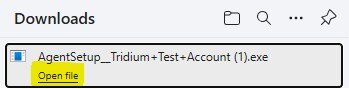
When downloaded, click “Open file”:
-
When presented with the “Do you want to allow this app to make changes to your device?” prompt, click “Yes”.
- Note: If you are presented with username and password fields, then the user you are currently logged in with does not have administrative permission to the computer. You will need to enter the credentials for a local administrator, or work with your IT team to install the agent application.
-
After proceeding, you will not see anything else on the screen. The rest of the installation is silent.
-
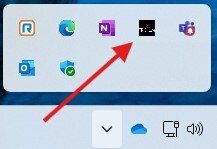
After a short time, the application will appear in your task tray, near the time:
-
That’s it. Setup is complete on this device.
Need help with this? Existing clients can request support through their usual support channel. Not a client yet? Call (727) 977-3111 or learn about Managed IT Operations.